
Open source · MIT · macOS
Your agents.Your Chrome.Your rules.
K-Browser lets the agents on your Mac use the Chrome you are already signed in to — in a window you can watch. Each agent sees only the tabs it opened, never takes your keyboard, and hands the tab to you when a person is needed.
# 1
$ npm install
# 2 · agents + bridge
$ k-browser install
? Block site categories: banking,email
✓ claude-code  ✓ codex  ✓ antigravity  ✓ gemini-cli
# 3 · pair the extension
$ k-browser pair
$ k-browser doctor
"ok": true, "startedBy": "launchd"- Claude Code
- Codex
- Antigravity
- Gemini CLI
- Kav
Three small parts, one clear boundary
Agents never touch Chrome directly. Every request goes through a local bridge that knows who is asking and what they may do.
- 1
MCP server
one per agent
Each agent gets its own token and permissions. Claude Code, Codex, Antigravity and Gemini CLI are registered for you.
- 2
Bridge
127.0.0.1:9444
A small local service, started at login. It enforces each client’s rules, masks secrets and keeps the activity log.
- 3
Extension
in your Chrome
Works only the agents’ own tabs, in a separate window that never comes to the front. Paired with a code you hold.
Built so you stay in control
An agent driving your signed-in browser has to be easy to watch, easy to stop, and unable to wander.
Only its own tabs
Every tab belongs to the agent that opened it. Your tabs — and other agents’ — cannot be listed, read or touched.
Never steals focus
Agent tabs live in their own window that never comes forward. Input reaches the page without taking your keyboard.
Re-checked before each press
Real mouse and keyboard input. If the page moved underneath, it stops instead of clicking the wrong thing.
Blocked site categories
Banking, payments, email, government, crypto, password managers: block what you like, per agent.
Page text is data
Everything from a page arrives marked as untrusted. Password fields are never read; secrets are masked.
Hands the tab to you
Logins, captchas and decisions come to you. The agent waits until you hand the tab back.
Watch and revoke
A side panel shows every agent’s tabs and actions as they happen. Revoke an agent with one click.
Risky tools start off
evalstays off until you turn it on for one specific agent. Screenshots can be switched off too.
See everything, from the side panel
Open the K-Browser side panel to see what each agent is doing, answer hand-offs, and change its rules without touching a config file.
- Each agent’s tabs and actions, live
- Hand-offs waiting for you, with Show and Return
- Blocked site categories, screenshots and eval, per agent
- Revoke an agent or close its tabs
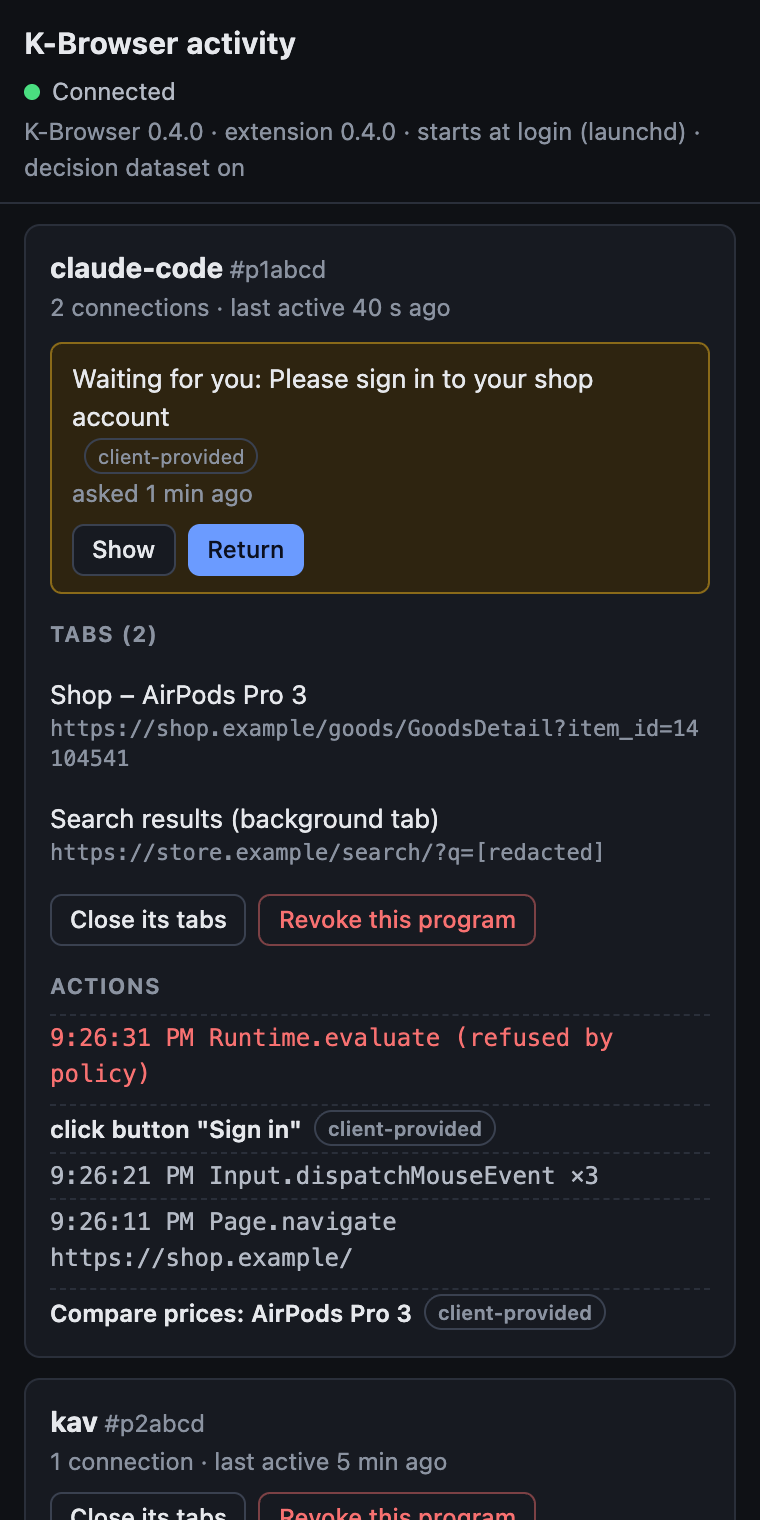
The tools an agent gets
Fifteen MCP tools, each scoped to the agent’s own tabs.
tabsOpen, list and close its own tabsnavigateLoad or reload a pagesnapshotAccessibility tree with refsreadVisible text, or rows by selectoractReal clicks and typing, re-checkedwait_forProve an action workednetworkRequests seen, secrets maskedfetchSame-origin GET with the tab’s cookiesfilesIts own download / upload areascreenshotPNG of the page, never storedneeds_humanHand the tab to youlearningsSite notes, kept on your MacstatusVersions, tabs, hand-offsevalJavaScript in an isolated world — off by defaultrun_flowRun a saved Kav flow — optional
Optional: fast, saved flows with Kav
Kav-FastwebAgent runs hand-written website flows without a model call per step. With Kav set up, agents get run_flow — it runs in your Chrome as that agent, under the same rules. Kav’s judgement calls go to a local model by default; the cloud model is opt-in and shows you what it would send.
Kav flowsGet started
macOS, Chrome 125+ and Node.js 22+.
- Get the code
git clone https://github.com/kaiwutech-TW/k-browser.git && cd k-browser && npm install - Register your agents and start the bridge
k-browser install - Load extension/ in chrome://extensions (Developer mode → Load unpacked)
- Pair the extension with the bridge
k-browser pair - Check, then restart your agent
k-browser doctor